Pixie Documentation
Pixie is a C# library for polished command-line output. It gives applications a semantic output model for logs, markup, diagnostics, help text, and GNU-style option parsing, then lets terminal renderers choose the best presentation for the current device.
Use Pixie when you want to:
- print structured terminal output without hand-formatting strings,
- report compiler-style diagnostics with source snippets,
- generate help output from the same option definitions you parse,
- keep output readable when ANSI styling or Unicode support is limited.
Install
dotnet add package Pixie
The Pixie package includes both the core APIs and the Pixie.Terminal assembly, so most applications only need this one package.
Start Here
| If you want to... | Read... |
|---|---|
| Print your first message | Getting Started |
| Understand Pixie's layers | Architecture |
| Build structured terminal output | Markup And Layout |
| Render compiler-style diagnostics | Diagnostics |
| Parse command-line options | Option Parsing |
| Look up types and members | API Reference |
Tiny Example
using Pixie;
using Pixie.Terminal;

var log = TerminalLog.Acquire();

log.Info("Hello from Pixie.");
TerminalLog.Acquire() writes to standard error, which is the usual place for diagnostics, warnings, help output, and other command-line feedback. Use TerminalLog.AcquireStandardOutput() when Pixie is producing normal program output.
What Pixie Can Render
Caret Diagnostics
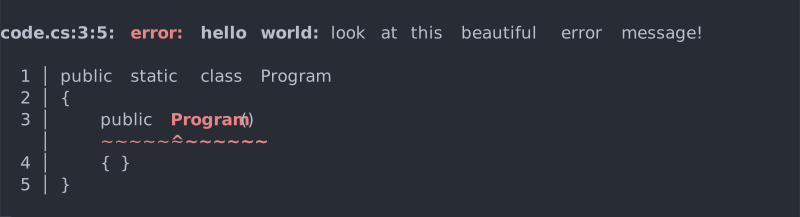
Pixie can render a diagnostic header and a highlighted source snippet from source spans and regions.
Option Parsing Feedback
Pixie's GNU-style option parser reports mistakes through the same logging and rendering path as the rest of your application output.

Generated Help
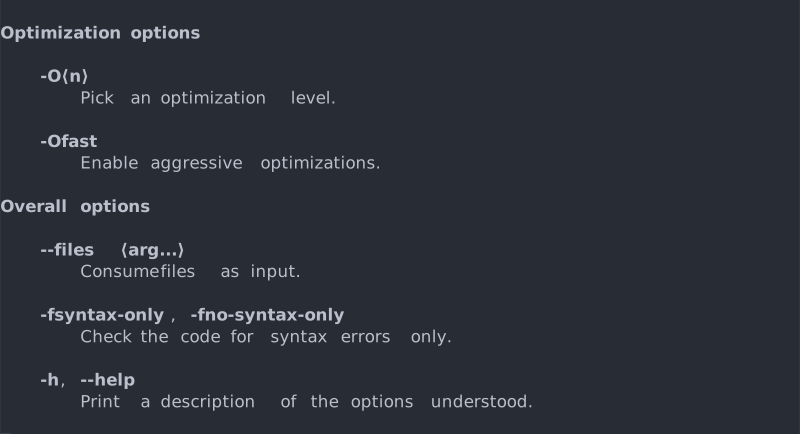
Help output is generated from option definitions, so parsing behavior and user-facing documentation stay aligned.
Terminal Degradation
Renderers choose output that fits the terminal. Rich terminals get richer output; limited terminals get readable fallbacks.

